> For the complete documentation index, see [llms.txt](https://docs.authgear.com/llms.txt). Markdown versions of documentation pages are available by appending `.md` to page URLs; this page is available as [Markdown](https://docs.authgear.com/admin-and-operations/monitor/audit-log-for-admin-api-and-portal.md).
# Audit Log for Admin API and Portal
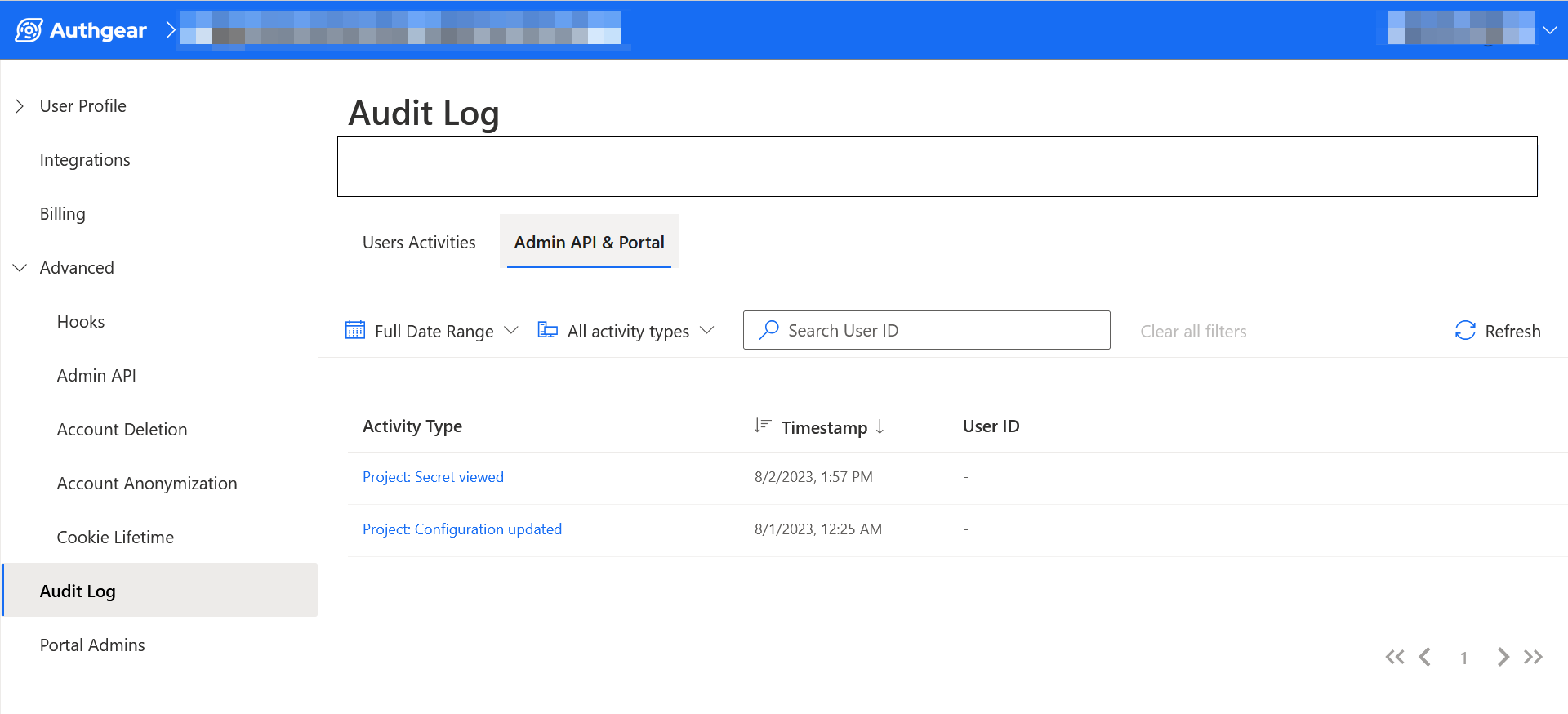
The Admin API & Portal tab in the Audit Log page allows you to analyze and monitor changes and activities that occur on Admin API and the Authgear Portal of your project.
The data under this tab can be handy for securing your Authgear project. For example, whenever an admin on your project downloads the Admin API key, the event is registered under the Admin API & Portal tab.
### Accessing Admin API & Portal Audit Through the Admin API.
Activity logs for Admin API and Portal are part of the data the **auditLogs** query returns.
For example, the following query will return any recent events from Admin API and Portal that have been logged:
```graphql
query {
auditLogs(first:5){
edges{
node{
activityType
clientID
createdAt
data
}
}
}
}
```
**Note:** The above request will also include events triggered by users.
### Log Events
The following is a list of the activity types that are logged:
#### Project Actions
| Activity type | Description |
| ----------------------------------------------- | ----------------------------------------------------------- |
| PROJECT\_APP\_SECRET\_VIEWED | An admin downloaded the Admin API key |
| PROJECT\_APP\_UPDATED | Project configurations updated |
| PROJECT\_BILLING\_CHECKOUT\_CREATED | An admin attempted to subscribe to one of the billing plans |
| PROJECT\_BILLING\_SUBSCRIPTION\_CANCELLED | Billing subscription was canceled |
| PROJECT\_BILLING\_SUBSCRIPTION\_STATUS\_UPDATED | Account billing status is updated |
| PROJECT\_BILLING\_SUBSCRIPTION\_UPDATED | Billing details updated |
| PROJECT\_COLLABORATOR\_DELETED | An admin is removed |
| PROJECT\_COLLABORATOR\_INVITATION\_ACCEPTED | A user accepted an invitation to become an admin |
| PROJECT\_COLLABORATOR\_INVITATION\_CREATED | Invitation to add new admin sent |
| PROJECT\_COLLABORATOR\_INVITATION\_DELETED | A previously sent admin invitation was canceled |
| PROJECT\_DOMAIN\_CREATED | A new custom domain name added |
| PROJECT\_DOMAIN\_DELETED | A custom domain name was removed |
| PROJECT\_DOMAIN\_VERIFIED | A domain name was successfully verified |
#### User Mutations
| Activity type | Description |
| ------------------------------------------------------------------ | ----------------------------------------------------------------------------------------------------------------------------------------- |
| ADMIN\_API\_MUTATION\_SET\_DISABLED\_STATUS\_EXECUTED | Admin disabled/enabled a user account |
| ADMIN\_API\_MUTATION\_CREATE\_SESSION\_EXECUTED | A new session is created |
| ADMIN\_API\_MUTATION\_ANONYMIZE\_USER\_EXECUTED | An admin initiated the process to annonymize a normal user. This command will delete all user data like email, full name and phone number |
| ADMIN\_API\_MUTATION\_CREATE\_IDENTITY\_EXECUTED | New Identity was created by an admin |
| ADMIN\_API\_MUTATION\_CREATE\_USER\_EXECUTED | An admin created a new user |
| ADMIN\_API\_MUTATION\_DELETE\_AUTHENTICATOR\_EXECUTED | An authenticator was removed |
| ADMIN\_API\_MUTATION\_DELETE\_AUTHORIZATION\_EXECUTED | An authorization was removed |
| ADMIN\_API\_MUTATION\_DELETE\_IDENTITY\_EXECUTED | Identity deleted |
| ADMIN\_API\_MUTATION\_DELETE\_USER\_EXECUTED | An admin deleted a user |
| ADMIN\_API\_MUTATION\_GENERATE\_OOB\_OTP\_CODE\_EXECUTED | New OTP code generated |
| ADMIN\_API\_MUTATION\_RESET\_PASSWORD\_EXECUTED | Password was reset by an admin |
| ADMIN\_API\_MUTATION\_REVOKE\_ALL\_SESSIONS\_EXECUTED | All sessions revoked |
| ADMIN\_API\_MUTATION\_REVOKE\_SESSION\_EXECUTED | A users session is revoked |
| ADMIN\_API\_MUTATION\_SCHEDULE\_ACCOUNT\_ANONYMIZATION\_EXECUTED | An admin scheduled the anonymization of a user account |
| ADMIN\_API\_MUTATION\_SCHEDULE\_ACCOUNT\_DELETION\_EXECUTED | An admin scheduled the deletion of a user |
| ADMIN\_API\_MUTATION\_SEND\_RESET\_PASSWORD\_MESSAGE\_EXECUTED | Password reset message was sent |
| ADMIN\_API\_MUTATION\_SET\_VERIFIED\_STATUS\_EXECUTED | Verified status for a user is updated |
| ADMIN\_API\_MUTATION\_UNSCHEDULE\_ACCOUNT\_ANONYMIZATION\_EXECUTED | A previously scheduled user anonymization request was canceled |
| ADMIN\_API\_MUTATION\_UNSCHEDULE\_ACCOUNT\_DELETION\_EXECUTED | A previously scheduled user deletion request was canceled |
| ADMIN\_API\_MUTATION\_UPDATE\_IDENTITY\_EXECUTED | Identity updated by admin |
| ADMIN\_API\_MUTATION\_UPDATE\_USER\_EXECUTED | An admin updated details like a user's name, gender and more |
---
# Agent Instructions
This documentation is published with GitBook. GitBook is the documentation platform designed so that both humans and AI agents can read, navigate, and reason over technical content effectively. Learn more at gitbook.com.
## Querying This Documentation
If you need additional information that is not directly available in this page, you can query the documentation dynamically by asking a question.
Perform an HTTP GET request on the current page URL with the `ask` query parameter, and the optional `goal` query parameter:
```
GET https://docs.authgear.com/admin-and-operations/monitor/audit-log-for-admin-api-and-portal.md?ask=&goal=
```
`ask` is the immediate question: it should be specific, self-contained, and written in natural language.
`goal` is optional and describes the broader end goal you are ultimately trying to accomplish on behalf of the user. GitBook uses it to tailor the answer towards what is most useful for that goal.
The response will contain a direct answer to the question and relevant excerpts and sources from the documentation.
Use this mechanism when the answer is not explicitly present in the current page, you need clarification or additional context, or you want to retrieve related documentation sections.